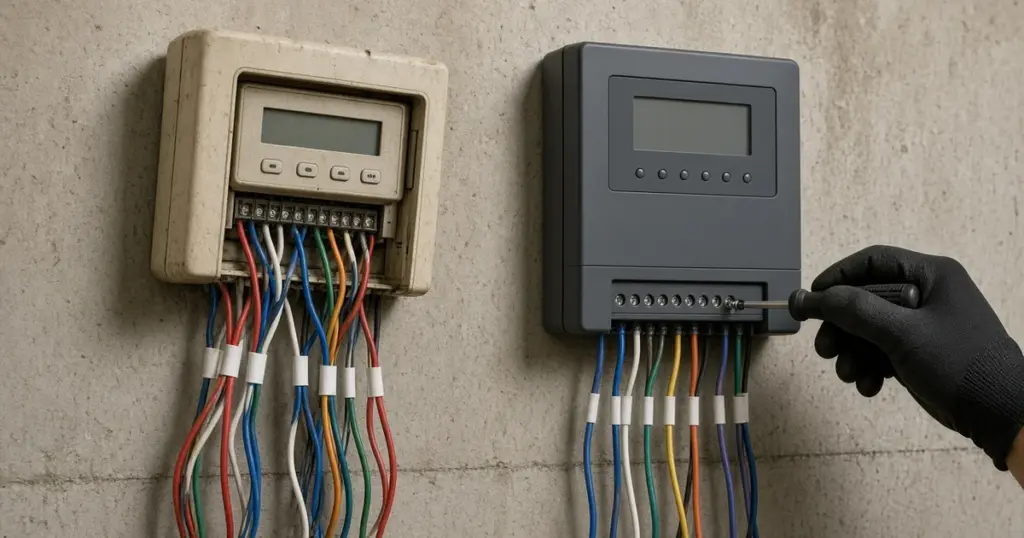
Sprinkler controllers do not last forever. Buttons wear out, displays fade, transformers fail, and older models lack features many homeowners now want, like weather-based adjustment or app control. Replacing the controller is one of the more approachable irrigation upgrades, because it usually does not involve digging. The wiring from the valves already terminates at the controller; the new unit simply takes over those connections.
That said, a careless swap can leave zones mislabeled, the common wire on the wrong terminal, or a rain sensor disconnected. This walkthrough explains how to replace a controller cleanly, with notes for homeowners in Huntsville, TX and the rest of Walker County.
Signs It Is Time for a New Controller
- The display is blank or unreadable and power has been confirmed.
- Programs are lost frequently, especially after power blips.
- Some zones will not run from the controller but work when tested directly at the valve.
- Buttons or dials do not respond.
- You want features the old unit cannot offer, such as weather adjustment, multiple programs, or remote control.
- Corrosion or water damage inside the cabinet.
Before replacing, rule out simple causes: a tripped outlet, a blown fuse, or a failed transformer. If one zone does not work, the issue may be wiring or a solenoid rather than the controller. Our pillar guide to controllers and smart irrigation explains how to tell the difference.
Choosing a Replacement
Zone count
Count the zone wires connected to the old controller and choose a unit with at least that many stations. Many people choose a few extra stations for future expansion.
Indoor or outdoor
Match the location. An outdoor controller must have a weather-resistant cabinet. Indoor units are often mounted in garages.
Smart or conventional
Smart controllers adjust watering using weather data or sensors and can be managed from a phone. Conventional controllers are simpler but need manual seasonal adjustment. Our existing post asking whether smart sprinkler controllers are worth it weighs the trade-offs for this area.
Rain and moisture shut-off
TCEQ guidance states that when a controller is replaced on an existing automatic system in most of Texas, a rain or moisture shut-off device must be installed if it is not already present. Some smart controllers can satisfy this requirement through weather data or a connected sensor; ask the installer or check the product documentation. See rain and freeze sensors and soil moisture sensors for options.
Step-by-Step Replacement
1. Record the old program
Write down the start times, run times, watering days, and any special programs. Even if you plan to change the schedule, the old one is a useful reference.
2. Photograph the wiring
Take clear photos of every terminal with the wires attached. Note which terminal is common, which numbered terminals have wires, and where any sensor or pump start relay is connected.
3. Label each wire
Use tape or labels on each wire with its zone number. This step prevents most replacement headaches.
4. Disconnect power
Unplug the controller or turn off the circuit for hardwired units. Hardwired high-voltage connections should be handled by someone qualified for electrical work.
5. Remove the old controller
Disconnect each wire and remove the unit from the wall.
6. Mount the new controller
Follow the manufacturer’s mounting instructions. For smart controllers, choose a spot with a reliable Wi-Fi signal.
7. Connect wires
- Common wire to the common terminal.
- Zone wires to the numbered terminals, matching your labels.
- Sensor wires to the sensor terminals.
- Pump or master valve to the designated terminal, if the system has one.
8. Restore power and test
Run each zone manually and walk the yard to confirm the right area waters. Rename zones in the controller or app to match what they water, such as “front lawn rotors” or “back beds drip.”
9. Program the new schedule
Do not just copy the old schedule. Set each zone based on head type, sun exposure, and soil. Our existing article on how to set a sprinkler controller walks through programming basics.
Troubleshooting After the Swap
- A zone does not run: check the wire connection at that terminal and confirm it is the right wire.
- Two areas water at once: wires may be swapped or doubled up.
- Nothing runs: check the common wire, power, and any sensor bypass setting.
- Smart controller offline: check Wi-Fi strength and the controller’s network setup.
Planning for Local Conditions
East Texas weather swings between heavy rain and long dry spells, so features like rain delay, seasonal adjustment, and multiple start times are valuable. The ability to split run times into cycles helps on clay soil and slopes. If you live in Huntsville city limits, you may also want a controller that makes it easy to follow watering days if a drought stage is declared.
Keeping the New Controller Running Well
A new controller is not a set-and-forget device. Review the schedule at each change of season, replace any backup battery as the manufacturer recommends, and keep the cabinet closed so dust and insects stay out. For smart controllers, keep the app and firmware updated and confirm the controller stays online after power outages or router changes.
When to Call a Pro
Call a professional if the controller is hardwired to household voltage, if wires are unlabeled and the old unit is already removed, if you have a pump start relay or master valve, if some zones still do not work after the swap, or if you want help choosing and programming a smart controller. We install and program controllers for homes across Huntsville and Walker County. See our sprinkler repair page and our irrigation installation page.
Frequently Asked Questions
Can I replace my sprinkler controller myself?
Many homeowners can, especially with plug-in units. Label wires carefully and test every zone afterward. Hardwired units may need an electrician.
Do I need a rain sensor when I replace my controller?
TCEQ guidance requires a rain or moisture shut-off device when a controller is replaced on an existing automatic system in most of Texas, if one is not already installed.
Will a new controller work with my old valves?
In most residential systems, yes. Standard low-voltage valves work with most controllers. Check compatibility if the system uses decoders or a pump.
Upgrade Your Controller
If you want help selecting, installing, or programming a new controller, call 346-586-6060 or contact us online.